AI agents are getting good at browsing the web. But they still interact with most sites by scraping HTML and guessing at structure. That is not great for anyone.
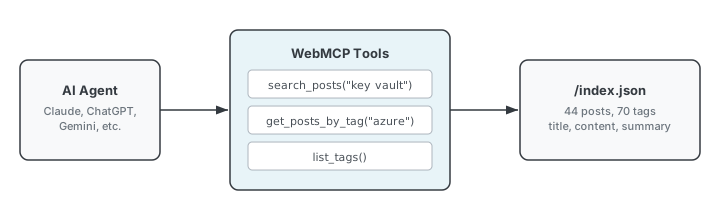
WebMCP changes that. It lets websites register tools that AI agents can call directly, the same way MCP works with Claude or other AI tools, except it runs in the browser instead of a local server.
It is a W3C draft specification currently in Chrome’s origin trial behind the Experimental Web Platform Features flag. Early. But interesting enough to build on.
I added it to this site. Here is why and how.
Why I Did This
I have 44 posts on this site, mostly about Azure, platform engineering, and infrastructure. That is a lot of content for someone to dig through manually.
With WebMCP, an AI agent visiting this site can search my posts by keyword, filter by tag, and get back structured results instead of parsing raw HTML. If someone asks an agent “what has this guy written about Key Vault,” the agent can actually answer that with real data.
The other reason is simpler: I wanted to build something today.
Why This Site Was a Good Fit
This site runs on Hugo with the PaperMod theme. Hugo already generates a JSON index of all posts at /index.json with title, content, permalink, summary, and tags.
That is a searchable dataset sitting there. I just needed to expose it through tools.
The Implementation
Three files.
1. Extended the JSON Index
Hugo’s default JSON index did not include tags. I overrode the template to add them.
{
  "title": "Why Idle Azure Resources Are Hard to Kill",
  "permalink": "https://gordorodriguez.com/posts/why-idle-azure-resources-are-hard-to-kill/",
  "summary": "We know idle resources waste money...",
  "tags": ["azure", "cost-optimization", "governance", "platform-engineering"],
  "content": "..."
}
One file in layouts/_default/index.json. Five lines of Hugo templating.
2. The WebMCP Script
The script registers three tools:
search_posts takes a keyword and searches across titles and content. Returns the top 10 matches with title, URL, summary, and tags.
get_posts_by_tag takes a tag name and returns every post with that tag.
list_tags returns all 70 tags on the site with post counts, sorted by frequency.
Each tool fetches /index.json once, caches it, and filters client-side. No backend. No API. Just a static JSON file and some array methods.
The script is wrapped in a feature detection check:
if (!('modelContext' in navigator)) return;
Browsers without WebMCP support get nothing. No errors, no warnings.
3. Loaded via Hugo’s Footer Hook
PaperMod has an extend_footer.html partial that is empty by default. I overrode it:
<script src="/js/webmcp.js" defer></script>
Loads on every page. Deferred so it does not block rendering.
What the Output Looks Like
Searching for “key vault” returns 15 results:
[
  {
    "title": "Azure Key Vault Soft Delete and Purge Protection Lessons Learned",
    "url": "https://gordorodriguez.com/posts/soft-delete-and-purge-protection-lessons-learned/",
    "summary": "We deleted a Key Vault. Then we could not recreate it...",
    "tags": ["azure", "key-vault", "security"]
  }
]
list_tags returns the full taxonomy:
[
  { "tag": "platform-engineering", "count": 32 },
  { "tag": "azure", "count": 23 },
  { "tag": "devops", "count": 11 },
  { "tag": "security", "count": 10 }
]
Seventy tags across 44 posts. Enough structure for an agent to navigate the site by topic.
What I Learned
More time reading the spec than writing code. The implementation was under 80 lines of JavaScript.
Hugo’s JSON output does most of the work. Most Hugo sites already generate a JSON index for search. WebMCP gives that index a second purpose. If your static site has structured data, you are halfway done.
Feature detection is the whole compatibility story. The spec is early. Most browsers do not support it. Wrapping everything in a feature check means the script is invisible in those browsers.
Fewer tools is better. I started with five and cut to three. The two I removed (get recent posts, get post count) did not add value beyond what the other tools already provided.
What I Would Add Next
If WebMCP gets broader adoption:
- get_post_content to return the full text of a specific post by URL
- search_by_date to filter posts by date range
Three tools is enough for now. The spec is not finalized. Better to ship something small than over-engineer for a standard that might change.
Is It Worth Adding to Your Site
If you run a static site with structured content, the cost is three files, no dependencies, no backend.
If the spec takes off, your site is ready. If it does not, you have a JavaScript file that does nothing.
The WebMCP specification is worth reading regardless. It shows where the browser-AI interface is headed. The web gets more useful when agents can interact with sites as structured tools instead of scraping HTML.
Related posts: